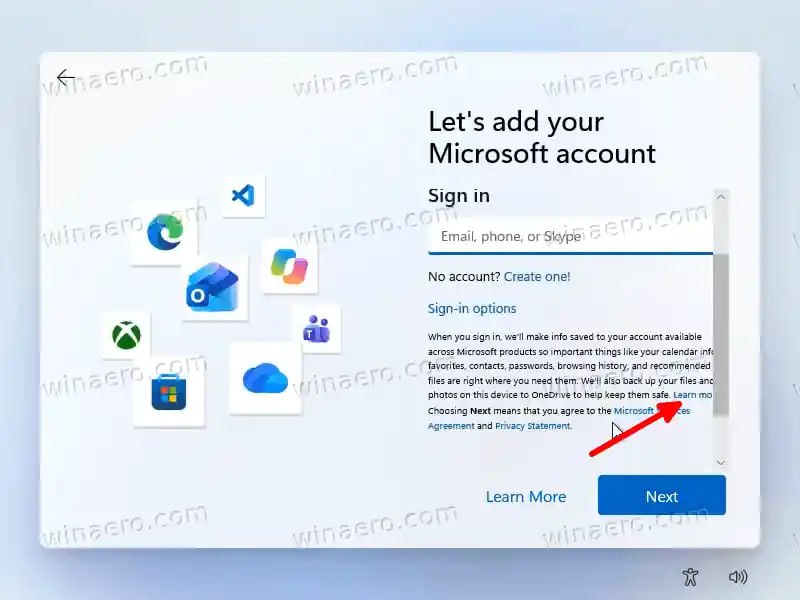
👤Windows 11 still pushes most users toward a Microsoft account during setup, but a newly discovered small workaround lets you create a local account instead. That matters for people who want a simpler, offline-style installation without cloud ties to services like OneDrive, Office, or sync features. For many everyday users, especially those watching costs or just wanting a basic login, the local option can feel more practical.
The trick appears during the out-of-box experience, or OOBE, when Windows asks for sign-in details. On the Microsoft account screen, look beneath the account name field and find the tiny “Learn more” link under the Sign-in options text. Clicking it opens the local account page directly, letting you continue setup without signing in to a Microsoft account.
This method is currently working in both Windows 11 Home and Pro editions, including stable releases and Insider builds. Microsoft may close it later, but as of September 2026, it works like a charm.
So, if you’re installing Windows 11 soon and want to avoid an online account, keep an eye on that small link during setup and use it before Microsoft changes the flow.
👤Windows 11 still pushes most users toward a Microsoft account during setup, but a newly discovered

Winaero
@winaeroThe official channel for the https://winaero.com web site. We are also available on X/twitter: https://x.com/winaero
6,263 subscribers
Open in Telegram